
User's Manual




Chapter 16 Remote Management Screens
NWA-3500/NWA-3550 User’s Guide
200
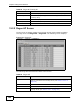
To change your NWA’s FTP settings, click REMOTE MGMT > FTP. The following
screen displays.
Figure 114 Remote Management: FTP
The following table describes the labels in this screen.
16.4 The WWW Screen
You can choose to configure your NWA via the World Wide Web (WWW) using a
Web browser. This lets you specify which IP addresses or computers are able to
communicate with and access the NWA.
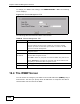
Table 55 Remote Management: FTP
LABEL DESCRIPTION
Server Port This is set to port 21 by default.
You may change the server port number for a service if needed,
however you must use the same port number in order to use that
service for remote management.
Server Access Select the interface(s) through which a computer may access the NWA
using this service.
Secured Client
IP Address
A secured client is a “trusted” computer that is allowed to communicate
with the NWA using this service.
Select All to allow any computer to access the NWA using this service.
Choose Selected to just allow the computer with the IP address that
you specify to access the NWA using this service.
Apply Click Apply to save your customized settings and exit this screen.
Reset Click Reset to begin configuring this screen afresh.