
User's Manual




Table Of Contents
- Media Server
- User’s Guide
- Getting to Know Your NSA
- NAS Starter Utility
- zCloud
- Web Configurator Basics
- Tutorials
- 5.1 Overview
- 5.2 Windows 7 Network
- 5.3 Windows 7 Network Map
- 5.4 Playing Media Files in Windows 7
- 5.5 Windows 7 Devices and Printers
- 5.6 Creating a Volume in a 2-Bay NSA
- 5.7 Creating a Volume in a 1-Bay NSA
- 5.8 Deleting a Volume
- 5.9 File Sharing Tutorials
- 5.10 Download Service Tutorial
- 5.11 Broadcatching Tutorial
- 5.12 Printer Server Tutorial
- 5.13 Copy and Flickr Auto Upload Tutorial
- 5.14 FTP Uploadr Tutorial
- 5.15 Web Configurator’s Security Sessions
- 5.16 Using FTPES to Connect to the NSA
- 5.17 Using a Mac to Access the NSA
- 5.18 How to Use the BackupPlanner
- Technical Reference
- Status Screen
- System Setting
- Storage
- Network
- Applications
- 10.1 Overview
- 10.2 What You Can Do
- 10.3 What You Need to Know
- 10.4 FTP Server
- 10.5 The Media Server Screens
- 10.6 The iTunes Server Screen
- 10.7 The Download Service Screen
- 10.8 The Web Publishing Screen
- 10.9 The Broadcatching Screen
- 10.10 The Print Server Screen
- 10.11 The Copy/Sync Button Screen
- 10.12 Technical Reference
- 10.12.1 Sharing Media Files on Your Network
- 10.12.2 Download Service
- 10.12.3 Link Capture Browser Plugin
- 10.12.4 Download Service Notification
- 10.12.5 P2P Download Security
- 10.12.6 Web Publishing Example
- 10.12.7 Web Publishing
- 10.12.8 Channel Guides for Broadcatching
- 10.12.9 Printer Sharing
- 10.12.10 Copying Files
- 10.12.11 Synchronizing Files
- Packages
- 11.1 Overview
- 11.2 What You Can Do
- 11.3 SMART Screen
- 11.4 DyDNS Screen
- 11.5 NFS Screen
- 11.6 Syslog Server Screen
- 11.7 TFTP Server Screen
- 11.8 eMule Screens
- 11.9 pyLoad Screen
- 11.10 ownCloud Setup
- 11.11 Polkast Setup
- 11.12 GoogleDrive
- 11.13 Memopal
- 11.14 Protect Screens
- 11.15 Backup Screens
- 11.16 Restore Screen
- 11.17 Technical Reference
- Auto Upload
- Dropbox
- Using Time Machine with the NSA
- Users
- Groups
- Shares
- Maintenance Screens
- Protecting Your Data
- Troubleshooting
- 20.1 Troubleshooting Overview
- 20.2 Power, Hardware, Connections, and LEDs
- 20.3 NAS Starter Utility
- 20.4 NSA Login and Access
- 20.5 I Cannot Access The NSA
- 20.6 Users Cannot Access the NSA
- 20.7 External USB Drives
- 20.8 Firmware
- 20.9 File Transfer
- 20.10 Networking
- 20.11 Some Features’ Screens Do Not Display
- 20.12 Media Server Functions
- 20.13 Download Service and Broadcatching Functions
- 20.14 Web Publishing
- 20.15 Auto Upload
- 20.16 Package Management
- 20.17 Backups
- 20.18 Google Drive
- Customer Support
- Product Specifications
- Legal Information
- Index
Chapter 18 Maintenance Screens
Media Server User’s Guide
338
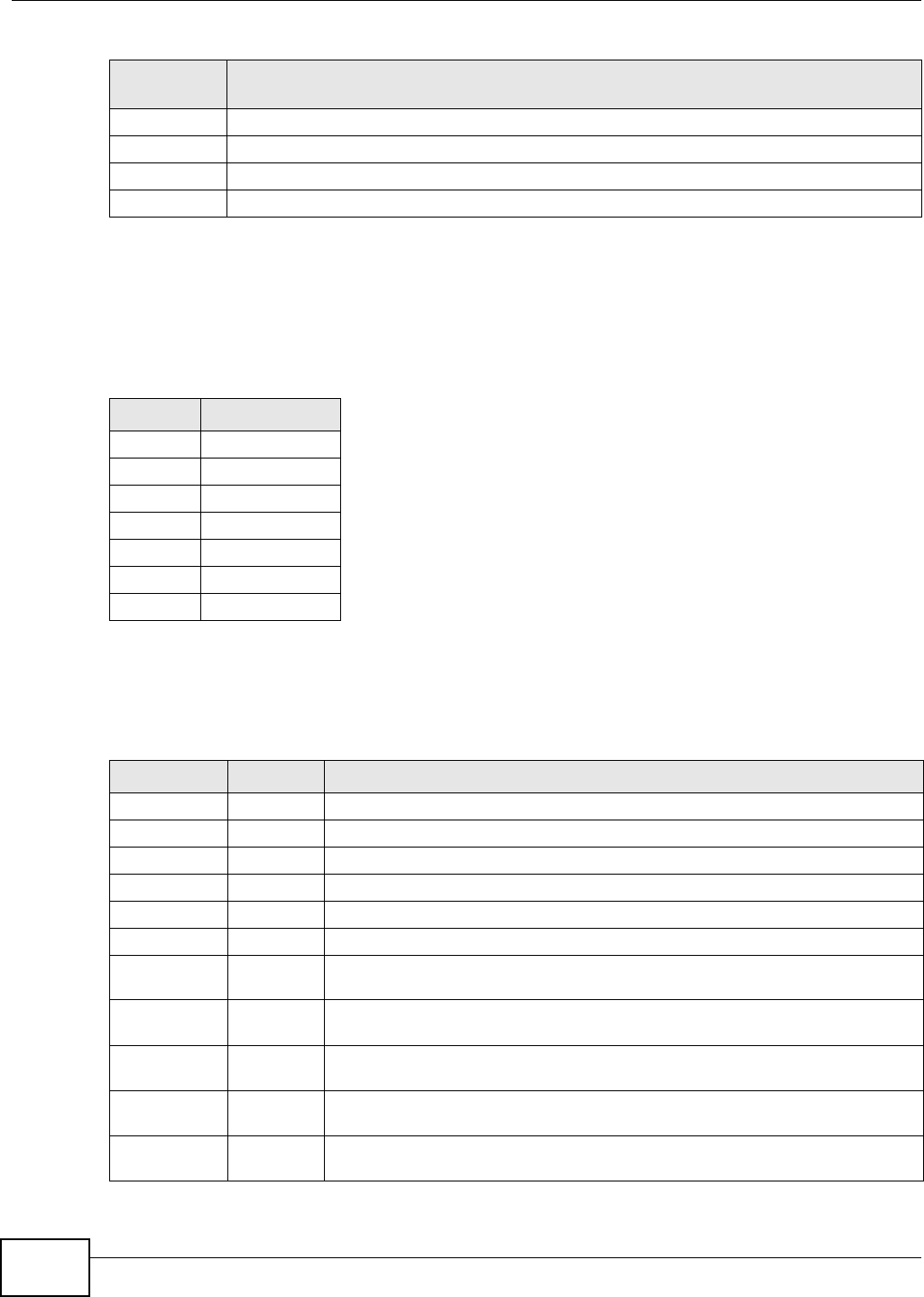
18.8.2 Log Severity Levels
The following table shows information on log severity levels. Levels range from 0 to 6 with 0 being
the most severe level log and 6 being an informational log only. Log levels are not displayed in the
logs and are for your reference only.
18.8.3 Log Messages
Here are some example log messages.
Network This log class shows information on network configuration, setting changes and so on.
Storage This log class shows information on the NSA’s internal and external storage activities.
Backup This log class shows information on all backup-related activities.
Auto Upload This log class shows information on automatic uploads done by the NSA.
Table 124 Log Classes (continued)
LOG
CATEGORY
DESCRIPTION
Table 125 Log Severity Levels
LEVEL DESCRIPTION
0Emergency
1Alert
2Critical
3 Error
4 Warning
5Notice
6Info
Table 126 Log Messages
CLASS SEVERITY MESSAGE
Auto upload INFO %s is queued.
Auto upload INFO %s uploaded (Flickr or YouTube Upload).
Auto upload WARNING error uploading "%s" (%s): %s
Auto upload INFO %s will not be uploaded to %s for there is already a duplicate file.
Auto upload INFO Failed to upload %s to %s (FTP Upload) : %s
Auto upload INFO Successfully upload %s to %s (FTP Upload)
Copy/Sync
Button
ERROR [USB %s] Backup Folder Does Not Exist.
Copy/Sync
Button
ERROR [USB %s] Target Folder Does Not Exist.
Copy/Sync
Button
ERROR [USB Sync] Failed at %s: It is a Folder in Internal Volume. But It is not a Folder
in USB.
Copy/Sync
Button
ERROR [USB Sync] Failed at %s: It is a Folder in USB. But It is not a Folder in Internal
Volume.
Copy/Sync
Button
ERROR [USB Sync] Failed at File %s.