
User's Manual


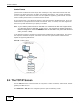


Table Of Contents
- Media Server
- User’s Guide
- Getting to Know Your NSA
- NAS Starter Utility
- zCloud
- Web Configurator Basics
- Tutorials
- 5.1 Overview
- 5.2 Windows 7 Network
- 5.3 Windows 7 Network Map
- 5.4 Playing Media Files in Windows 7
- 5.5 Windows 7 Devices and Printers
- 5.6 Creating a Volume in a 2-Bay NSA
- 5.7 Creating a Volume in a 1-Bay NSA
- 5.8 Deleting a Volume
- 5.9 File Sharing Tutorials
- 5.10 Download Service Tutorial
- 5.11 Broadcatching Tutorial
- 5.12 Printer Server Tutorial
- 5.13 Copy and Flickr Auto Upload Tutorial
- 5.14 FTP Uploadr Tutorial
- 5.15 Web Configurator’s Security Sessions
- 5.16 Using FTPES to Connect to the NSA
- 5.17 Using a Mac to Access the NSA
- 5.18 How to Use the BackupPlanner
- Technical Reference
- Status Screen
- System Setting
- Storage
- Network
- Applications
- 10.1 Overview
- 10.2 What You Can Do
- 10.3 What You Need to Know
- 10.4 FTP Server
- 10.5 The Media Server Screens
- 10.6 The iTunes Server Screen
- 10.7 The Download Service Screen
- 10.8 The Web Publishing Screen
- 10.9 The Broadcatching Screen
- 10.10 The Print Server Screen
- 10.11 The Copy/Sync Button Screen
- 10.12 Technical Reference
- 10.12.1 Sharing Media Files on Your Network
- 10.12.2 Download Service
- 10.12.3 Link Capture Browser Plugin
- 10.12.4 Download Service Notification
- 10.12.5 P2P Download Security
- 10.12.6 Web Publishing Example
- 10.12.7 Web Publishing
- 10.12.8 Channel Guides for Broadcatching
- 10.12.9 Printer Sharing
- 10.12.10 Copying Files
- 10.12.11 Synchronizing Files
- Packages
- 11.1 Overview
- 11.2 What You Can Do
- 11.3 SMART Screen
- 11.4 DyDNS Screen
- 11.5 NFS Screen
- 11.6 Syslog Server Screen
- 11.7 TFTP Server Screen
- 11.8 eMule Screens
- 11.9 pyLoad Screen
- 11.10 ownCloud Setup
- 11.11 Polkast Setup
- 11.12 GoogleDrive
- 11.13 Memopal
- 11.14 Protect Screens
- 11.15 Backup Screens
- 11.16 Restore Screen
- 11.17 Technical Reference
- Auto Upload
- Dropbox
- Using Time Machine with the NSA
- Users
- Groups
- Shares
- Maintenance Screens
- Protecting Your Data
- Troubleshooting
- 20.1 Troubleshooting Overview
- 20.2 Power, Hardware, Connections, and LEDs
- 20.3 NAS Starter Utility
- 20.4 NSA Login and Access
- 20.5 I Cannot Access The NSA
- 20.6 Users Cannot Access the NSA
- 20.7 External USB Drives
- 20.8 Firmware
- 20.9 File Transfer
- 20.10 Networking
- 20.11 Some Features’ Screens Do Not Display
- 20.12 Media Server Functions
- 20.13 Download Service and Broadcatching Functions
- 20.14 Web Publishing
- 20.15 Auto Upload
- 20.16 Package Management
- 20.17 Backups
- 20.18 Google Drive
- Customer Support
- Product Specifications
- Legal Information
- Index

Chapter 9 Network
Media Server User’s Guide
180
For example, if the NSA’s IP address was 192.168.1.33 when you applied the UPnP Port Mapping
screen’s settings and the NSA later gets a new IP address of 192.168.1.34 through DHCP, WAN
access stops working because the Internet gateway still tries to forward traffic to IP address
192.168.1.33. Since you can no longer access the NSA from the WAN, you would have to access
the NSA from the LAN and re-apply your UPnP Port Mapping screen settings to update the
Internet gateway’s UPnP port mappings.
Figure 67 UPnP Using the Wrong IP Address
9.5.2 UPnP and Security
UPnP’s automated nature makes it easier to use than manually configuring firewall and NAT rules,
but it is also less secure. Using UPnP may make your network more susceptible to snooping and
hacking attacks.
9.5.3 The NSA’s Services and UPnP
This section introduces the NSA’s services which an Internet gateway can use UPnP to allow access
to from the Internet.
CIFS (Windows File Sharing)
Common Internet File System (CIFS) is a standard protocol supported by most operating systems
in order to share files across the network. Using UPnP port mapping for CIFS allows users to
connect from the Internet and use programs like Windows Explorer to access the NSA’s shares to
copy files from the NSA, delete files on the NSA, or upload files to the NSA from the Internet.
If you configure UPnP port mapping to allow CIFS access from the WAN but cannot get it to work,
you may also have to configure the Internet gateway to also allow NetBIOS traffic. See Section 7.3
on page 151 for more on CIFS.
FTP
File Transfer Protocol is a standard file transfer service used on the Internet. Using UPnP port
mapping for FTP allows remote users to use FTP from the Internet to access the NSA’s shares. A
user with read and write access to a share can copy files from the share, delete files from the share,
or upload files to the share. See Section 10.4 on page 187 for more on FTP. If you use UPnP to allow
FTP access from the WAN, you may want to use a different WAN port number (instead of the default
of port 21) to make it more secure. Remember to tell the remote users to use the custom port
number when using FTP to access the NSA.
192.168.1.34
a.b.c.d
192.168.1.33