
User's Manual



ZyWALL 10/50 Internet Security Gateway
4-2 General and WAN Setup
IP address that changes each time you reconnect. Your friends or relatives will always be able to call you
even if they don’t know your IP address.
First of all, you need to have registered a dynamic DNS account with www.dyndns.org. This is for people
with a dynamic IP from their ISP or DHCP server that would still like to have a DNS name.
To use this service, you must register with the Dynamic DNS service provider. The Dynamic DNS service
provider will give you a password or key. The ZyWALL supports www.dyndns.org. You can apply to this
service provider for Dynamic DNS service.
4.2.1 DYNDNS Wildcard
Enabling the wildcard feature for your host causes *.yourhost.dyndns.org to be aliased to the same IP
address as yourhost.dyndns.org. This feature is useful if you want to be able to use for example,
www.yourhost.dyndns.org and still reach your hostname.
4.3 General Setup
Step 1. Enter 1 in the main menu to open Menu 1 — General Setup.
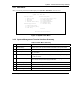
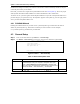
Step 2. The Menu 1 - General Setup screen appears, as shown next. Fill in the required fields.
Figure 4-1 Menu 1 — General Setup
Table 4-1 General Setup Menu Field
FIELD DESCRIPTION EXAMPLE
System Name Choose a descriptive name for identification purposes. It is
recommended you enter your computer’s “Computer name” (see
section 4.1Error! Reference source not found.) in this field. This
name can be up to 30 alphanumeric characters long. Spaces are not
allowed, but dashes “-” and underscores "_" are accepted.
ZyWALL
Domain Name Enter the domain name (if you know it) here. If you leave this field
bl k th ISP i d i i DHCP Y t
zyxel.com.tw
Menu 1 - General Setup
System Name= ZyWALL
Domain Name=zyxel.com.tw
Edit Dynamic DNS= No
Press ENTER to Confirm or ESC to Cancel: