
User's Manual

ZyWALL 10/50 Internet Security Gateway
18-8 Filter Configuration
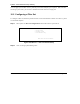
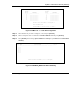
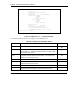
Figure 18-7 Menu 21.1.1.1 — TCP/IP Filter Rule
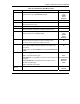
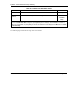
The following table describes how to configure your TCP/IP filter rule.
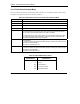
Table 18-3 TCP/IP Filter Rule Menu Fields
FIELD DESCRIPTION OPTIONS
Active
Yes activates the filter rule and No deactivates it. Yes
No
IP Protocol Protocol refers to the upper layer protocol, e.g., TCP is 6, UDP is
17 and ICMP is 1. This value must be between 0 and 255. A value
of 0 matches ANY protocol.
0-255
IP Source
Route
If Yes, the rule applies to packet with IP source route option; else
the packet must not have source route option. The majority of IP
packets do not have source route.
Yes
No
Destination
IP Address Enter the destination IP Address of the packet you wish to filter.
This field is ignored if it is 0.0.0.0.
0.0.0.0
IP Mask
Enter the IP mask to apply to the Destination: IP Addr.
0.0.0.0
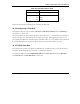
Port # Enter the destination port of the packets that you wish to filter. The
range of this field is 0 to 65535. This field is ignored if it is 0.
0-65535
Menu 21.1.1.1 - TCP/IP Filter Rule
Filter #: 1,1
Filter Type= TCP/IP Filter Rule
Active= Yes
IP Protocol= 0 IP Source Route= No
Destination: IP Addr=
IP Mask=
Port #=
Port # Comp= None
Source: IP Addr=
IP Mask=
Port #=
Port # Comp= None
TCP Estab= N/A
More= No Log= None
Action Matched= Check Next Rule
Action Not Matched= Check Next Rule
Press ENTER to Confirm or ESC to Cancel:
Press Space Bar to Toggle.