
User's Manual




ZyAIR B-2000 Wireless LAN Gateway with 4-Port Switch
Filter Configuration 7-13
filters are applied to the raw packets that appear on the wire. They are applied at the point where the ZyAIR
is receiving and sending the packets; for instance, the interface. The interface can be an Ethernet, or any
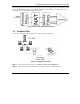
other hardware port. The following figure illustrates this.
Figure 7-10 Protocol and Device Filter Sets
7.5 Example Filter
Let’s look at an example to block outside users from telnetting into the ZyAIR.
Figure 7-11 Sample Telnet Filter
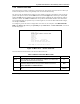
Step 1. Enter 21 from the main menu to open Menu 21 – Filter Set Configuration.
Step 2. Enter the index number of the filter set you want to configure (in this example, 3)
.