
User's Manual




ZyAIR B-2000 Wireless LAN Gateway with 4-Port Switch
Filter Configuration 7-9
Table 7-3 TCP/IP Filter Rule Menu Fields
FIELD DESCRIPTION EXAMPLE
Log Select the logging option from the following:
None – No packets will be logged.
Action Matched – Only packets that match the rule
parameters will be logged.
Action Not Matched – Only packets that do not match the
rule parameters will be logged.
Both – All packets will be logged.
None
Action Matched
Select the action for a matching packet. Choices are Check
Next Rule, Forward or Drop.
Check Next Rule
(default)
Action Not Matched Select the action for a packet not matching the rule. Choices
are Check Next Rule, Forward or Drop.
Check Next Rule
(default)
When you have completed this menu, press [ENTER] at the prompt “Press ENTER to confirm or ESC to
cancel” to save your configuration or press [ESC] to cancel and go back to the previous screen.
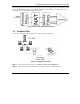
The following figure illustrates the logic flow of an IP filter.