
User's Manual




ZyAIR B-2000 Wireless LAN Gateway with 4-Port Switch
Filter Configuration 7-7
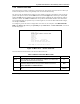
Figure 7-7 Menu 21.1.1 – TCP/IP Filter Rule
The following table describes how to configure your TCP/IP filter rule.
Table 7-3 TCP/IP Filter Rule Menu Fields
FIELD DESCRIPTION EXAMPLE
Filter # This is the filter set, filter rule coordinates, for instance, 2, 3
refers to the second filter set and the third filter rule of that
set.
1,1
Filter Type Press [SPACE BAR] and the [ENTER] to select filter type.
Choices are TCP/IP Filter Rule or Generic Filter Rule.
TCP/IP Filter
Rule
(default)
Active
Select Yes to activate or No to deactivate the filter rule. No
(default)
IP Protocol This is the upper layer protocol, for example, TCP is 6, UDP
is 17 and ICMP is 1. The value must be between 0 and 255.
A value of 0 matches ANY protocol.
0 to 255
Menu 21.1.1 - TCP/IP Filter Rule
Filter #: 1,1
Filter Type= TCP/IP Filter Rule
Active= Yes
IP Protocol= 6 IP Source Route= No
Destination: IP Addr= 0.0.0.0
IP Mask= 0.0.0.0
Port #= 137
Port # Comp= Equal
Source: IP Addr= 0.0.0.0
IP Mask= 0.0.0.0
Port #=
Port # Comp= None
TCP Estab= No
More= No Log= None
Action Matched= Drop
Action Not Matched= Check Next Rule
Press ENTER to Confirm or ESC to Cancel: