
User's Manual



VSG-1200 User’s Guide
82 Chapter 7 Billing Profiles and PMS Configuration
7.2 PMS (Property Management System)
Many hotels use a PMS device to perform in-room billing for services (such as room service,
mini-bar, pay-per-view TV or telephone) that the guests use.
With PMS, the VSG allows subscribers to purchase additional time units online. In addition,
subscribers can select from a number of different billing plans.
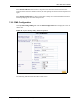
To use PMS for billing, first connect the VSG to a PMS device using the PMS port (refer to
Chapter 2, “Hardware Installation and Connection,” on page 35), then configure the PMS
settings on the VSG.
7.2.1 Port-Location Mapping Charge Modes
When you activate port-location mapping and PMS on the VSG, two charge modes are
available: per room and per subscriber.
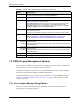
Duration Select a time period (minute, hour, day, week, month or Unlimited) and enter the
time unit in the field provided (not available for Unlimited).
Charge Specify the unit cost in this field.
Check Time Select Period Time Finish for time-to-finish billing method. Refer to Section 6.1.5
“RADIUS” on page 72 for more information.
Select Expired when and specify the time from the drop-down list box(es) for the
accumulate billing method. The subscriber accounts will be invalid once the
allocated time period is used up. This option is only available when you select the
Day, Week or Month option in the Period Time field.
Selective Unit Specify the range of time units (between 1 and 99) a subscriber is allowed to
purchase at any one time.
The range is presented as a drop-down list box in the information pop-up window.
Bandwidth Limit
Note: You must activate bandwidth management to use this feature.
Refer to Chapter 16, “Bandwidth Management,” on page 141.
Set the fields below to configure the bandwidth limit for this billing profile.
Uplink
Bandwidth
Limitation
To use a pre-defined option, select the first option and choose a bandwidth from the
drop-down list box.
To manually set the bandwidth, select the second option and specify the bandwidth
in the field provided.
Downlink
Bandwidth
Limitation
To use a pre-defined option, select the first option and choose a bandwidth from the
drop-down list box.
To manually set the bandwidth, select the second option and specify the bandwidth
in the field provided.
Reset Click Reset to restart configuring this screen again.
Apply Click Apply to save the changes.
Table 20 System Setting: Billing: Billing Profile Setting (continued)
LABEL DESCRIPTION