
User's Manual




VSG-1200 User’s Guide
190 Chapter 25 Secure Socket Layer
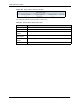
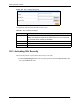
Figure 123 SSL Certificate Download
The following table describes the labels in this screen.
25.3 Activating SSL Security
Follow the steps below to activate the SSL security in the VSG.
1 Click System Setting, Servers in the navigation panel and select the SSL Security check
box in the Web Server field.
Table 65 SSL Certificate Download
LABEL DESCRIPTION
Password Enter the secret password you used when applying for the certificate.
Note: This password must be the same as the one you entered at
the CA’s site when creating a certificate.
Certificate File Specify the certificate sent to you by a CA.
Private Key File Specify the file that holds the private key.
Apply Click Apply to start the file transfer process.