
User's Manual





Prestige 1600 Universal Access Concentrator
System Information and Maintenance
14-8
14.4 Diagnostic
The diagnostic facility allows you to test the different aspects of your Prestige to determine if it is working
properly. Menu 24.4 allows you to choose among various types of diagnostic tests to evaluate your system, as
shown next. “xDSL” refers to the network module type, i.e., ADSL, IDSL or SDSL.
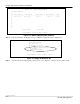
Figure 14-11 Menu 24.4 - System Maintenance - Diagnostic
Follow this procedure to get to the Diagnostic screen.
Step 1
From the Main Menu, select option 24 to open Menu 24 - System Maintenance.
Step 2 From this menu, select option 4. This will open Menu 24.4 - System Maintenance - Diagnostic.
The following table describes the diagnostic tests available in Menu 24.4 for your Prestige and the connections.
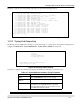
Table 14-6 System Maintenance Menu Diagnostic
Field
Description
Drop xDSL Port Connection Drops xDSL Port connection.
Reset xDSL Port Hardware Resets xDSL Port Hardware.
xDSL Port Test Performs xDSL Port test.
Reboot System This option reboots the Prestige.
Command Mode This option allows you to diagnose and test your Prestige
using a specified set of commands.
Ping Host This diagnostic test pings the host, which determines the
functionality of the TCP/IP protocol on both systems and the
links in between.
Slot Number Enter the slot number containing the port you wish to
diagnose.
Port Number Enter xDSL port number.
Host IP Address Enter the host IP address.
Menu 24.4 - System Maintenance – Diagnostic
xDSL
1. Drop xDSL Port Connection
2. Reset xDSL Port Hardware
3. xDSL Port Test
TCP/IP
12. Ping Host
System
21. Reboot System
22. Command Mode
Enter Menu Selection Number:
Slot Number= N/A
Port Number= N/A
Host IP Address= N/A