
Operation Manual






Chapter 17 Universal Plug-and-Play (UPnP)
NBG334S User’s Guide
164
17.4.0.2 Using UPnP in Windows XP Example
This section shows you how to use the UPnP feature in Windows XP. You must already have
UPnP installed in Windows XP and UPnP activated on the NBG334S.
Make sure the computer is connected to a LAN port of the NBG334S. Turn on your computer
and the NBG334S.
Auto-discover Your UPnP-enabled Network Device
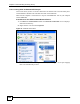
1 Click Start and Control Panel. Double-click Network Connections. An icon displays
under Internet Gateway.
2 Right-click the icon and select Properties.
Figure 93 Network Connections
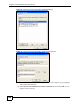
3 In the Internet Connection Properties window, click Settings to see the port mappings
there were automatically created.