
Operation Manual






Chapter 17 Universal Plug-and-Play (UPnP)
NBG334S User’s Guide
161
17.4 Installing UPnP in Windows Example
This section shows how to install UPnP in Windows Me and Windows XP.
17.4.0.1 Installing UPnP in Windows Me
Follow the steps below to install the UPnP in Windows Me.
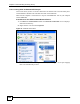
1 Click Start and Control Panel. Double-click Add/Remove Programs.
2 Click on the Windows Setup tab and select Communication in the Components
selection box. Click Details.
Figure 88 Add/Remove Programs: Windows Setup: Communication
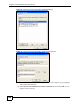
3 In the Communications window, select the Universal Plug and Play check box in the
Components selection box.
Apply Click Apply to save the setting to the NBG334S.
Cancel Click Cancel to return to the previously saved settings.
Table 68 Management > UPnP > General
LABEL DESCRIPTION