
Operation Manual




Chapter 10 Network Address Translation (NAT)
NBG334S User’s Guide
119
Figure 66 Trigger Port Forwarding Process: Example
1 Jane requests a file from the Real Audio server (port 7070).
2 Port 7070 is a “trigger” port and causes the NBG334S to record Jane’s computer IP
address. The NBG334S associates Jane's computer IP address with the "incoming" port
range of 6970-7170.
3 The Real Audio server responds using a port number ranging between 6970-7170.
4 The NBG334S forwards the traffic to Jane’s computer IP address.
5 Only Jane can connect to the Real Audio server until the connection is closed or times
out. The NBG334S times out in three minutes with UDP (User Datagram Protocol), or
two hours with TCP/IP (Transfer Control Protocol/Internet Protocol).
10.5.2 Two Points To Remember About Trigger Ports
1 Trigger events only happen on data that is going coming from inside the NBG334S and
going to the outside.
2 If an application needs a continuous data stream, that port (range) will be tied up so that
another computer on the LAN can’t trigger it.
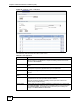
10.6 NAT Advanced Screen
To change your NBG334S’s trigger port settings, click Network > NAT > Advanced. The
screen appears as shown.
" Only one LAN computer can use a trigger port (range) at a time.