
Operation Manual




Chapter 4 Introducing the Web Configurator
NBG318S User’s Guide
48
4.4.2 Navigation Panel
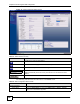
After you enter the password, use the sub-menus on the navigation panel to configure
NBG318S features.
The following table describes the sub-menus.
- Configuration Mode This shows whether the advanced screens of each feature are turned on
(Advanced) or not (Basic).
Interface Status
Interface This displays the NBG318S port types. The port types are: WAN, LAN, WLAN and
HomePlug AV.
Status For the LAN and WAN ports, this field displays Down (line is down) or Up (line is up
or connected).
For the WLAN, it displays Up when the WLAN is enabled or Down when the WLAN
is disabled.
For the HomePlug AV port it displays Up when the power cord is connected.
Rate For the LAN ports, this displays the port speed and duplex setting or N/A when the
line is disconnected.
For the WAN port, it displays the port speed and duplex setting if you’re using
Ethernet encapsulation and Idle (line (ppp) idle), Dial (starting to trigger a call) and
Drop (dropping a call) if you're using PPPoE or PPTP encapsulation. This field
displays N/A when the line is disconnected.
For the WLAN, it displays the maximum transmission rate when the WLAN is
enabled and N/A when the WLAN is disabled.
For the HomePlug AV port it displays the maximum transmission rate when the
HomePlug AV is enabled.
Summary
Any IP Table Use this screen to view details of IP addresses assigned to devices not in the same
subnet as the NBG318S.
BW MGMT Monitor Use this screen to view the NBG318S’s bandwidth usage and allotments.
DHCP Table Use this screen to view current DHCP client information.
Packet Statistics Use this screen to view port status and packet specific statistics.
WLAN Station Status Use this screen to view the wireless stations that are currently associated to the
NBG318S.
My HomePlug Network Use this screen to view information on the stations connected to your Home Plug
network.
Table 5 Web Configurator Status Screen (continued)
LABEL DESCRIPTION
Table 6 Screens Summary
LINK TAB FUNCTION
Status This screen shows the NBG318S’s general device, system and
interface status information. Use this screen to access the wizard,
and summary statistics tables.
Network