
Operation Manual




Chapter 4 Introducing the Web Configurator
NBG318S User’s Guide
47
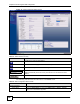
Firmware Version This is the ZyNOS firmware version and the date created. ZyNOS is ZyXEL's
proprietary Network Operating System design.
WAN Information
- MAC Address This shows the WAN Ethernet adapter MAC Address of your device.
- IP Address This shows the WAN port’s IP address.
- IP Subnet Mask This shows the WAN port’s subnet mask.
- DHCP This shows the WAN port’s DHCP role - Client or None.
LAN Information
- MAC Address This shows the LAN Ethernet adapter MAC Address of your device.
- IP Address This shows the LAN port’s IP address.
- IP Subnet Mask This shows the LAN port’s subnet mask.
- DHCP This shows the LAN port’s DHCP role - Server or None.
WLAN Information
- MAC Address This shows the wireless adapter MAC Address of your device.
- Name (SSID) This shows a descriptive name used to identify the NBG318S in the wireless LAN.
- Channel This shows the channel number which you select manually.
- Operating Channel This shows the channel number which the NBG318S is currently using over the
wireless LAN.
- Security Mode This shows the level of wireless security the NBG318S is using.
- 802.11 Mode This shows the wireless standard.
- Super G Mode This shows whether SuperG is enabled or not.
- WPS This shows whether WiFi Protected Setup is configured or not. Click this to go to the
Network > Wireless LAN > WPS screen (see
Section 7.9 on page 101).
HomePlug Information
- MAC Address This shows the MAC Address of your device.
- Firmware Version This shows the HomePlug firmware version number.
System Status
System Uptime This is the total time the NBG318S has been on.
Current Date/Time This field displays your NBG318S’s present date and time.
System Resource
- CPU Usage This displays what percentage of the NBG318S’s processing ability is currently used.
When this percentage is close to 100%, the NBG318S is running at full load, and the
throughput is not going to improve anymore. If you want some applications to have
more throughput, you should turn off other applications (for example, using
bandwidth management.
- Memory Usage This shows what percentage of the heap memory the NBG318S is using. Heap
memory refers to the memory that is not used by ZyNOS (ZyXEL Network Operating
System) and is thus available for running processes like NAT and the firewall.
System Setting
- Firewall This shows whether the firewall is active or not.
- Bandwidth Management This shows whether the bandwidth management is active or not.
- UPnP This shows whether UPnP is active or not.
Table 5 Web Configurator Status Screen (continued)
LABEL DESCRIPTION