
Operation Manual




Chapter 4 Introducing the Web Configurator
NBG318S User’s Guide
46
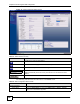
Figure 10 Web Configurator Status Screen
The following table describes the icons shown in the Status screen.
Table 4 Status Screen Icon Key
ICON DESCRIPTION
Click this icon to open the setup wizard.
Click this icon to view copyright and a link for related product information.
Click this icon at any time to exit the web configurator.
Select a number of seconds or None from the drop-down list box to refresh all screen
statistics automatically at the end of every time interval or to not refresh the screen
statistics.
Click this button to refresh the status screen statistics.
The following table describes the labels shown in the Status screen.
Table 5 Web Configurator Status Screen
LABEL DESCRIPTION
Device Information
System Name This is the System Name you enter in the Maintenance > System > General
screen. It is for identification purposes.