
Operation Manual




Chapter 4 Introducing the Web Configurator
NBG318S User’s Guide
45
4.3 Resetting the NBG318S
If you forget your password or cannot access the web configurator, you will need to use the
RESET button at the back of the NBG318S to reload the factory-default configuration file.
This means that you will lose all configurations that you had previously saved, and the
password will be reset to “1234”.
4.3.1 Procedure to Use the Reset Button
1 Make sure the POWER LED is on.
2 Press the RESET button for ten seconds or until the POWER LED begins to blink and
then release it. When the POWER LED begins to blink, the defaults have been restored
and the NBG318S restarts.
4.4 Navigating the Web Configurator
The following summarizes how to navigate the web configurator from the Status screen.
4.4.1 The Status Screen
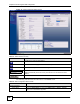
The following screen displays when you log into the NBG318S.
" Not all fields are available when you select Basic mode (see Section 4.2 on
page 43). See the Configuration Mode field in the System Status box to
check whether you are in Basic or Advanced mode. Use the Config Mode >
General screen to change between modes.