
Operation Manual




Chapter 17 Bandwidth Management
NBG318S User’s Guide
173
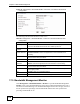
Figure 93 Management > Bandwidth MGMT > Advanced: Rule Configuration
The following table describes the labels in this screen.
Table 68 Management > Bandwidth MGMT > Advanced: Application Rule Configuration
LABEL DESCRIPTION
# This is the number of an individual bandwidth management rule.
Enable Select an interface’s check box to enable bandwidth management on that
interface.
Direction These read-only labels represent the physical interfaces. Bandwidth
management applies to all traffic flowing out of the router through the interface,
regardless of the traffic’s source.
Traffic redirect or IP alias may cause LAN-to-LAN traffic to pass through the
NBG318S and be managed by bandwidth management.
Bandwidth Select Maximum Bandwidth or Minimum Bandwidth and specify the maximum
or minimum bandwidth allowed for the rule in kilobits per second.
Destination Port This is the port number of the destination. See Appendix F on page 287 for some
common services and port numbers.
Source Port This is the port number of the source. See Appendix F on page 287 for some
common services and port numbers.
Protocol This is the protocol (TCP or UDP) used for the service.
OK Click OK to save your customized settings.
Cancel Click Cancel to exit this screen without saving.
17.8.2 Rule Configuration with the User-defined Service
In addition to the pre-defined services, if you want to edit a bandwidth management rule for
other applications and/or subnets, click the Edit icon in the User-defined Service table of the
Advanced screen. The following screen displays.