
Operation Manual



Chapter 11 DHCP
NBG318S User’s Guide
134
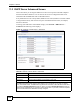
The following table describes the labels in this screen.
Table 51 Network > DHCP Server > Client List
LABEL DESCRIPTION
# This is the index number of the host computer.
IP Address This field displays the IP address relative to the # field listed above.
Host Name This field displays the computer host name.
MAC Address The MAC (Media Access Control) or Ethernet address on a LAN (Local Area
Network) is unique to your computer (six pairs of hexadecimal notation).
A network interface card such as an Ethernet adapter has a hardwired
address that is assigned at the factory. This address follows an industry
standard that ensures no other adapter has a similar address.
Reserve Select this check box to have the NBG318S always assign this IP address to
this MAC address (and host name). After you click Apply, the MAC address
and IP address also display in the Advanced screen (where you can edit
them).
Refresh Click Refresh to reload the DHCP table.