
User`s guide





Chapter 4 Tutorials
VMG1312-B Series User’s Guide
70
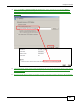
11 Select Custom under Device Type and click Settings.
Tutorial: Custom Port Settings
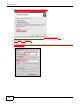
12 Confirm the IP address of the Device in the Printer Name or IP Address field.
13 Select Raw under Protocol.
14 The Port Number is automatically configured as 9100. Click OK to go back to the previous screen
and click Next.
Tutorial: Custom Port Settings