
User`s guide





Chapter 4 Tutorials
VMG1312-B Series User’s Guide
67
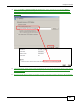
4 Select the Select a shared printer by name option. Enter the URL for your printer, http://
192.168.1.1:631/printers/USB_PRINTER, in this example. This URL can be found in the
Device’s Web Configurator on the Network Setting > USB Service > Printer Server screen.
Click Next.
Tutorial: Add Printer Wizard: Welcome
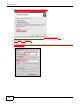
5 Install the printer driver. Please check the Windows CD if it includes the printer driver. If not, please
install the driver from the CD included with your printer or by downloading it from the printer
vendor’s website.
6 After the printer driver installs successfully, choose if you want to set this printer to be the default.