
User`s guide





Chapter 4 Tutorials
VMG1312-B Series User’s Guide
65
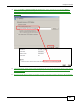
1 Click Start > Control Panel > Printers and FaxesDevices and Printers to open the Printers
and FaxesDevices and Printers screen. Click Add a pPrinter.
Tutorial: Printers Folder
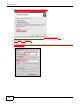
2 The Add Printer wWizard screen displays. Click NextAdd a network, wireless or Bluetooth
printer.
Tutorial: Add Printer Wizard: Welcome