
User`s guide






Chapter 2 Tutorial
P-2602HWUDL-D User’s Guide
79
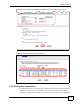
4 Select the SIP1 checkbox in the Incoming Call apply to section to have the phone
(connected to the first phone port) receive phone calls for the SIP1 account.
5 Click Apply to save your changes.
Figure 51 Tutorial Example: Analog Phone
2.7.2.3 Peer-to-Peer Call Configuration
Follow the steps below to configure a speed dial entry for peer-to-peer calls.
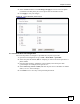
1 Open the web configurator and go to VoIP > Phone Book > Speed Dial.
2 Select the speed-dial number (#01 for example) you want to use for the peer device’s
phone number.
3 Enter the phone number (“22222222” in this example) and a descriptive name
(“peerexample” for example) for the peer device.
4 Select Non-Proxy (Use IP or URL) and enter the peer device’s IP address or domain
name (“10.1.2.3” in this example).
5 Click Add to save a new entry in the speed dial phone book.