
User`s guide






Chapter 2 Tutorial
P-2602HWUDL-D User’s Guide
78
The following table shows the information you need in this example.
2.7.2.1 SIP Account Configuration
If you didn’t register a SIP account before and want to make only peer-to-peer VoIP calls,
follow the steps below to configure an unregistered SIP account for the phone attached to the
ZyXEL Device.
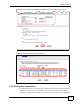
1 Click VoIP > SIP.
2 Select SIP1 to configure the first SIP account.
3 Select the checkbox to enable the SIP account on the ZyXEL Device.
4 Enter the SIP number (“12345678” in this example) which you want to map to the phone
attached to the ZyXEL Device.
5 Leave other fields blank or at the default
6 Click Apply to save your changes.
Figure 50 Tutorial Example: SIP Settings for an Unregistered SIP Account
2.7.2.2 Analog Phone Configuration
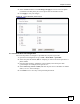
1 Click VoIP > Phone to open the Analog Phone screen.
2 Select Phone 1 to configure the first phone port.
3 Select the SIP1 checkbox in the Outgoing Call Use section to have the phone
(connected to the first phone port) use the SIP1 account to make outgoing calls.
SIP Number of the Phone Connected
to the ZyXEL Device
12345678
Peer Device’s IP Address or URL 10.1.2.3
Peer Device’s SIP Number 22222222