
User`s guide






Chapter 2 Tutorial
P-2602HWUDL-D User’s Guide
77
2.7.1.2 Analog Phone Configuration
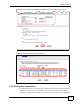
1 Click VoIP > Phone to open the Analog Phone screen.
2 Select Phone 1 to configure the first phone port.
3 Select the SIP1 checkbox in the Outgoing Call Use section to have the phone
(connected to the first phone port) use the registered SIP1 account to make outgoing
calls.
4 Select the SIP1 checkbox in the Incoming Call apply to section to have the phone
(connected to the first phone port) receive phone calls for the SIP1 account.
5 Click Apply to save your changes.
Figure 49 Tutorial Example: Analog Phone
2.7.1.3 Making a VoIP Call
1 Make sure you connect a telephone to the first phone port on the ZyXEL Device.
2 Make sure the ZyXEL Device is on and connected to the Internet.
3 Pick up the phone receiver.
4 Dial the VoIP phone number you want to call.
2.7.2 VoIP Calls Without a SIP Server
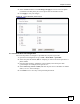
To make a call directly to a peer VoIP device over the Internet, you need to know the IP
address or domain name of the peer device. In a peer-to-peer call, there is no VoIP service
provider involved. You don’t need to register a SIP account successfully with the SIP server.
Therefore, the SIP account does not need to be a real SIP account, but you should still activate
the SIP account and configure its number and map it to a phone port.
This section shows you examples of how to make peer-to-peer calls.