
User`s guide






Chapter 2 Tutorial
P-2602HWUDL-D User’s Guide
75
2.7 How to Make a VoIP Call
You can register a SIP account with the SIP server and make voice calls over the Internet to
another VoIP device. You can also make a peer-to-peer call to a VoIP device directly without a
registered SIP account or SIP server. You must know the peer device’s IP address or domain
name.
2.7.1 VoIP Calls With a Registered SIP Account
To use a registered SIP account, you should have applied for a SIP account with the VoIP
service provider and got account information from your provider.
This section shows you examples of how to register your SIP account on the ZyXEL Device
and make Internet calls.
The following table shows the SIP account and SIP server address provided by your service
provider.
2.7.1.1 SIP Account Registration
Follow the steps below to register and activate your SIP account.
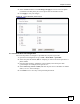
1 Make sure your ZyXEL Device is connected to the Internet.
2 Open the web configurator and go to VoIP > SIP.
3 Select SIP1 to configure the first SIP account.
4 Select the checkbox to enable the SIP account on the ZyXEL Device.
5 Enter the SIP number (“12345678” in this example) which is the part before the @
symbol in your SIP account.
6 Enter the SIP server address (“127.1.2.3” in this example).
7 Repeat the SIP server address in the REGISTER Server Address field.
8 Enter the SIP server domain (“voipprovider.com” in this example) which is the part after
the @ symbol in your SIP account.
9 Enter your user name and password. Click Apply to save your changes.
SIP Account 12345678@voipprovider.com
SIP Server Address 127.1.2.3
User Name username123
Password password123