
User`s guide






Chapter 2 Tutorial
P-2602HWUDL-D User’s Guide
74
correct information in the WAN and NAT Address Mapping screens. Also check that
the Internet account is active and the computer’s IP address is in the same subnet as the
ZyXEL Device.
2 Open your web browser and try accessing the web server (1.2.3.5) from the outside
network. If you cannot access the web server, make sure the NAT address mapping rule
is configured correctly and there is a firewall rule to allow HTTP traffic from the WAN
to the web server.
3 Try accessing the FTP server (1.2.3.4) from the outside network to send or retrieve a file.
If you cannot access the FTP server, make sure the NAT port forwarding rule is active
and there is a firewall rule to allow FTP traffic from the WAN to FTP server.
2.6 Using NAT with Multiple Game Players
If two users (behind the ZyXEL Device) want to connect to the same server to play online
games at the same time, but the server does not allow more than one login from the same IP
address, you can configure a many-to-many rule instead of a many-to-one rule.
In this example, you have four static IP addresses (1.2.3.4 to 1.2.3.7) from your ISP. After you
set up your WAN connection (see Section 2.5.2 on page 59), use the NAT > Address
Mapping screen to map the third and forth public IP addresses to the mail server
(192.168.1.12) and web server (192.168.1.13) respectively. The first and second public IP
addresses are mapped to other outgoing LAN traffic. See Section 2.5.3 on page 62 for more
information about IP address mapping.
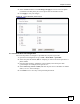
When you finish configuration, the screen looks as shown.
Figure 46 Tutorial Example: NAT Address Mapping Done: Game Playing
" To allow traffic from the WAN to be forwarded through the ZyXEL Device, you
must also create a firewall rule. Refer to Section 2.5.5 on page 67 for more
information.