
User`s guide




Chapter 2 Tutorial
P-2602HWUDL-D User’s Guide
67
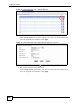
Figure 34 Tutorial Example: NAT Address Mapping Edit: Server
3 Select a number and click the Edit Details link to edit a port forwarding set.
4 Select FTP from the Service Name drop-down list box, and enter “192.168.1.39” as the
server IP address. Click Add to add the rule to the table.
5 Click Apply to go back to the Edit Address Mapping Rule screen. Click Apply again.
Figure 35 Tutorial Example: NAT Port Forwarding
2.5.5 Allow WAN-to-LAN Traffic through the Firewall
By default, the ZyXEL Device blocks any traffic initiated from the WAN to the LAN. To have
the ZyXEL Device forward traffic initiated from the WAN to a local computer or server on the
LAN, you need to configure a firewall rule to allow it.
In this example, you create the firewall rules to allow traffic from the WAN to the following
servers on the LAN:
• Web server
• Mail server
• FTP server