
User`s guide





Appendix A Setting up Your Computer’s IP Address
P-2602HWUDL-D User’s Guide
456
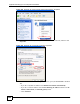
Figure 333 Windows Vista: Start Menu
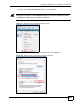
2 In the Control Panel, double-click Network and Internet.
Figure 334 Windows Vista: Control Panel
3 Click Network and Sharing Center.
Figure 335 Windows Vista: Network And Internet
4 Click Manage network connections.
Figure 336 Windows Vista: Network and Sharing Center