
User`s guide





Appendix A Setting up Your Computer’s IP Address
P-2602HWUDL-D User’s Guide
451
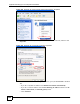
Figure 326 Windows XP: Start Menu
2 In the Control Panel, double-click Network Connections (Network and Dial-up
Connections in Windows 2000/NT).
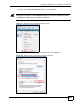
Figure 327 Windows XP: Control Panel
3 Right-click Local Area Connection and then click Properties.