
User`s guide



Chapter 31 Troubleshooting
P-2602HWUDL-D User’s Guide
430
Figure 319 Outgoing Calls: Default
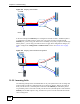
In the next example, the PHONE port is configured to use SIP account 1 and DECT phone 1
is configured to use SIP account 2. In this case, every time you place a call through the
PHONE port, you are using your SIP account 1. Similarly, every time you place a call through
DECT phone 1, you are using your SIP account 2. To apply these configuration changes you
need to configure the Analog Phone and DECT Phone screens. See Section 12.8 on page
200.
Figure 320 Outgoing Calls: Individual Configuration
31.5.2 Incoming Calls
The following example shows the default behavior of your ZyXEL Device for incoming calls
when two SIP accounts are configured and you are using two phones. When a call comes in
from your SIP account 1, both the phone connected to the PHONE port and DECT phone 1
ring. Similarly, when a call comes in from your SIP account 2, both the phone connected to the
PHONE port and DECT phone 1 ring. In either case you are not sure which SIP account the
call is coming from.
DECT 1
PHONE
Internet
SIP 1
SIP 2
DECT 1
PHONE
Internet
SIP 1
SIP 2