
User`s guide



Chapter 31 Troubleshooting
P-2602HWUDL-D User’s Guide
429
• Check the settings for QoS. If it is disabled, you might consider activating it. If it is
enabled, you might consider raising or lowering the priority for some applications.
31.4 Phone Calls and VoIP
V The telephone port won’t work or the telephone lacks a dial tone.
1 Check the telephone connections and telephone wire.
2 Make sure you have the VoIP SIP Settings screen properly configured.
V I can access the Internet, but cannot make VoIP calls.
1 Make sure you have the VoIP SIP Settings screen properly configured.
2 The PHONE light should come on. Make sure that your telephone is connected to the
PHONE port.
3 You can also check the VoIP status in the Status screen.
4 If the VoIP settings are correct, use speed dial to make peer-to-peer calls. If you can
make a call using speed dial, there may be something wrong with the SIP server, contact
your VoIP service provider.
31.5 Multiple SIP Accounts
You can set up two SIP accounts on your ZyXEL Device and your ZyXEL Device is equipped
with two phone ports. By default your ZyXEL Device uses SIP account 1 with all connected
phones for outgoing calls, and it uses SIP accounts 1 and 2 for incoming calls. With this
setting, you always use SIP account 1 for your outgoing calls and you cannot distinguish
which SIP account the calls are coming in through. If you want to control the use of different
dialing plans for accounting purposes or other reasons, you need to configure your phone ports
in order to control which SIP account you are using when placing or receiving calls.
31.5.1 Outgoing Calls
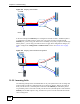
The following figure represents the default behavior of your ZyXEL Device when two SIP
accounts are configured and you are using two phones. When you place a call from the
PHONE port or DECT phone 1, the ZyXEL Device will use SIP account 1.