
User`s guide





Chapter 26 File Sharing
P-2602HWUDL-D User’s Guide
380
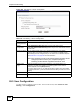
Figure 285 File Sharing > Server Configuration
Each field is described in the following table.
26.5 User Configuration
Use this screen to configure a user account. To access this screen, click Advanced > File
Sharing > User Configuration.
Table 135 File Sharing > Server Configuration
LABEL DESCRIPTION
Enable File
Sharing Services
Select this to enable file sharing through the ZyXEL Device.
Server
Configuration
Select Default Share Directory List to use the preset share names.
Select User-Defined Share Directory List to use your own share names and set
access levels.
Workgroup Name
You can add the ZyXEL Device to an existing workgroup on your network
Type the name of an existing workgroup on your network. The ZyXEL Device
automatically joins this workgroup and you can browse to it via Windows Explorer.
See Section 26.2.1 on page 378 for more information.
Note: If the workgroup name is not entered exactly the same as the
workgroup name to which your computer belongs to,
browsing via the network neighborhood will not work.
System Code
Page
Select the character set of the files contained on your storage device. For
example, if your files were created on an operating system which used the
Russian alphabet, select cp866 (Russian).
If the file or folder names on your USB storage device appear as unrecognizable
(or jumbled) characters, you should double check this setting to make sure it is set
correctly.
Apply
Click this to save your changes to the ZyXEL Device.
Cancel
Click this to set every field in this screen to its last-saved value.