
User`s guide





Chapter 26 File Sharing
P-2602HWUDL-D User’s Guide
379
Figure 283 Check the Workgroup Name
26.3 User Accounts
The ZyXEL Device requires that a user enter a user name and password in order to access files
on the USB storage device. When you browse to the ZyXEL Device you are prompted for a
user name and password before you can access files on the USB storage device.
Figure 284 File Sharing Login
Once logged in, you do not have to re-login until you restart the computer, even if the
administrator changes the username and password.
26.4 File Sharing - Server Configuration
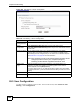
Use this screen to set up file sharing via the ZyXEL Device. To access this screen, click
Advanced > File Sharing.