
User`s guide






Chapter 12 Voice
P-2602HWUDL-D User’s Guide
208
12.11 Common Phone Settings Screen
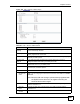
Use this screen to activate and deactivate immediate dialing and set up call fallback. To access
this screen, click VoIP > Phone > Common.
Figure 150 Phone > Common
Each field is described in the following table.
Apply Click this to save your changes and to apply them to the ZyXEL Device.
Cancel Click this to set every field in this screen to its last-saved value.
Table 62 VoIP > Phone > DECT Phone
LABEL DESCRIPTION
Table 63 Phone > Common
LABEL DESCRIPTION
Immediate Dial
Active Immediate
Dial
Select this if you want to use the pound key (#) to tell the ZyXEL Device to make
the phone call immediately, instead of waiting the number of seconds you selected
in the Dialing Interval Selection in VoIP > Phone > Analog Phone > Advanced
Setup.
If you select this, dial the phone number, and then press the pound key. The
ZyXEL Device makes the call immediately, instead of waiting. You can still wait, if
you want.
Call Fallback
Force to PSTN if
SIP unregistered
Select this to have the ZyXEL Device redirect outgoing calls to the PSTN
connection if there are no SIP accounts registered on the ZyXEL Device.
When you try to make a SIP call, but no SIP account is registered, the ZyXEL
Device uses the phone line connected to the PSTN port to make the call.
Force to SIP if
PSTN unplugged
Select this to have the ZyXEL Device redirect outgoing calls to the registered SIP
account if the ZyXEL Device is not connected to the PSTN network.
When you try to make a PSTN call, but the PSTN port on the ZyXEL Device is
unplugged, the ZyXEL Device uses the phone port’s registered SIP account to
make the call.
Apply
Click this to save your changes and to apply them to the ZyXEL Device.
Cancel
Click this to set every field in this screen to its last-saved value.