
User`s guide






Chapter 12 Voice
P-2602HWUDL-D User’s Guide
205
12.10.1.1 DECT Base Station Reset
Resetting the DECT base station erases all the details of the DECT phones registered with the
ZyXEL Device. You can do this to clear the DECT base station memory of the DECT phones
no longer used with the ZyXEL Device, for example if one of your DECT phones is lost.
When you reset the DECT base station, you will need to re-register all the phones that you
want to use with the ZyXEL Device.
" Resetting the DECT base station does not reset the PIN you use for registering
DECT phones. You must use the last PIN you configured to register or re-
register your DECT phones.
Press the DECT base station button (refer to Figure 146 on page 204) for 12 seconds or more
to reset the DECT base station.
12.10.2 Using your DECT Phone
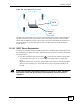
You can use your DECT phone to make calls to other DECT phones registered with the
ZyXEL Device (A). These calls are referred to as internal calls.
You can also use your DECT phone to make VoIP calls (B). For the PSTN models, you can
also make calls via the PSTN line (C). These types of calls are referred to as external calls.
Figure 148 Using Your DECT Phone
C
PSTN
Internet
VoIP
B
A