
User`s guide






Chapter 12 Voice
P-2602HWUDL-D User’s Guide
203
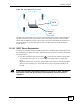
Figure 145 DECT Base Station Overview
The DECT base station follows the Generic Access Profile (GAP). GAP (a subset of DECT)
specifies how DECT phones register with a DECT base station. The DECT GAP standard
ensures that two different products (a phone and a base station) from different manufacturers
can work together. Any phone that supports GAP can make and receive calls through the
ZyXEL Device.
12.10.1 DECT Phone Registration
In order to use your DECT phone with the ZyXEL Device, the DECT phone must register with
the ZyXEL Device’s DECT base station. Follow these steps to register your DECT phone with
the ZyXEL Device.
1 Press down the DECT base station button ( ) on the left side (when facing the LEDs)
of your ZyXEL Device for 6 to 11 seconds to put the ZyXEL Device in registration
mode.
Registration mode refers to the state of the ZyXEL Device when it is scanning for DECT
phones in its surrounding area. The ZyXEL Device stays in registration mode for 30
seconds.
" If you press the DECT base station button for 12 seconds or more, the DECT
base station resets and all previously registered DECT phones must be re-
registered.
PSTN
Internet
VoIP