
User Manual


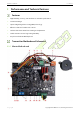

Table Of Contents

ZKAM20 & ZKAM20A User Manual
Page | 10 Copyright©2022 ZKTECO CO., LTD. All rights reserved.
NO.
Port
Function
1 WIIFI Module Connect the device through the APP for debugging.
2 Transmit Antenna Transmitting antenna interface.
3 Alarm Indicator Alarm indicator interface.
4 Buzzer Buzzer interface.
5
Receive Antenna
Receiving antenna interface.
6
Slave Board Interface
One master supports up to two slaves.
7 TF Card Slot For program upgrade.
8 Power Indicator Red light on.
9 Slave Unit Indicator The green light is on when the slave machine is working .
10 Master Unit Indicator
When the master is working, the blue light is on; just one
device on the same set of internet lines has the blue light
on.
; if there is still a blue light on, it is necessary to check
the internet line.
11 Sensitivity Indication and Threshold Used to adjust the sensitivity of tag recognition.
12 Program Selection
Choose different programs to deal with different
environmental disturbances.
13 Interference Indication
Digital display of surrounding environmental
disturbances.
14 Transmit Switch
When plugged in, the transmit switch is turned on; when
unplugged, the transmit switch is turned off.
15
Power Output
For slave power supply, light box power supply.
16
Power Interface
Power input interface.