D Barcode Scanner User Manual User Manual ZKAM20 & ZKAM20A Date: September 2022 Doc Version: 1.1 English Thank you for choosing our product. Please read the instructions carefully before operation. Follow these instructions to ensure that the product is functioning properly. The images shown in this manual are for illustrative purposes only. For further details, please visit our Company’s website www.zkteco.com. P a g e |1 Copyright©2020 ZKTECO CO., LTD. All rights reserved.
ZKAM20 & ZKAM20A User Manual Copyright © 2022 ZKTECO CO., LTD. All rights reserved. Without the prior written consent of ZKTeco, no portion of this manual can be copied or forwarded in any way or form. All parts of this manual belong to ZKTeco and its subsidiaries (hereinafter the "Company" or "ZKTeco"). Trademark is a registered trademark of ZKTeco. Other trademarks involved in this manual are owned by their respective owners.
ZKAM20 & ZKAM20A User Manual relating to the use of the information contained in or referenced by this manual, even if ZKTeco has been advised of the possibility of such damages. This manual and the information contained therein may include technical, other inaccuracies or typographical errors. ZKTeco periodically changes the information herein which will be incorporated into new additions/amendments to the manual.
ZKAM20 & ZKAM20A User Manual About the Company ZKTeco is one of the world’s largest manufacturer of RFID and Biometric (Fingerprint, Facial, Finger-vein) readers. Product offerings include Access Control readers and panels, Near & Far-range Facial Recognition Cameras, Elevator/Floor access controllers, Turnstiles, License Plate Recognition (LPR) gate controllers and Consumer products including battery-operated fingerprint and face-reader door locks.
ZKAM20 & ZKAM20A User Manual Table of Contents 1 OVERVIEW ............................................................................................................................................ 6 INTRODUCTION................................................................................................................................................................................................ 6 APPEARANCE ..........................................................................................
ZKAM20 & ZKAM20A 1 User Manual Overview Introduction EAS (Electronic Article Surveillance) system, also known as Electronic Article Theft Prevention System, is one of the commodity security measures widely used in the large-scale retail industry. EAS system is mainly composed of three parts: detector, deactivator and electronic tag. Antenna is installed in the exit of store. Tag contains a tiny electronic circuit. When the tag appears in the detection range, antenna gives an alarm.
ZKAM20 & ZKAM20A User Manual 1.2.3 Electronic Tag There are electronic tags with different appearances to choose from. System Introduction The AM system is designed with the low power consumption, low transmit power, and excellent at detecting 58kHz electronic tags. Designed with acrylic material, with built-in LED light bead, the overall lighting is excellent, and it is aesthetically outstanding and perfectly matches the interior of your store.
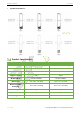
ZKAM20 & ZKAM20A User Manual Tag Detection Distance Product Specifications Model ZKAM20 ZKAM20A Detection Range 0.9m to 2.2m (Depend on tag) 0.9m to 2.2m (Depend on tag) Power AC110 ~ 220V, 50 ~ 60hz AC110 ~ 220V, 50 ~ 60hz Rated Power 10W 10W Center Frequency 58Khz 58Khz Working Mode TX+RX or MONO TX+RX or MONO Dimensions 1550 * 410 * 140 (mm) 1520 * 300 * 25 (mm) Dimensions With Packaging 1570 * 470 * 230(mm) 1570 * 350 * 150 (mm) Net Weight 10.2 Kg / ctn 16.
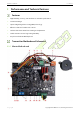
ZKAM20 & ZKAM20A 2 User Manual Performance and Technical Features Features • High flexibility, accuracy, anti-interference and stable performance. • Low-Power Design. • Superior Digital Signal Processing (DSP) technology. • Effective solutions for multi aisle scenario. • Software based anti-interference tuning and adjustment. • Stable structure ensures long-lasting durability. • Acrylic board built-in LED lamp bead. Transmitter Motherboard Schematic 2.2.
ZKAM20 & ZKAM20A User Manual NO. Port 1 WIIFI Module 2 Transmit Antenna 3 Alarm Indicator 4 Buzzer 5 Receive Antenna 6 Slave Board Interface 7 TF Card Slot 8 Power Indicator 9 Slave Unit Indicator The green light is on when the slave machine is working . 10 Master Unit Indicator When the master is working, the blue light is on; just one device on the same set of internet lines has the blue light on.; if there is still a blue light on, it is necessary to check the internet line.
ZKAM20 & ZKAM20A User Manual 2.2.2 Slave Motherboard NO. Port 1 Transmit Antenna Transmitting antenna interface. 2 Receive Antenna Receiving antenna interface. 3 Slave Board Interface (Import) 4 Transmit Switch When plugged in, the transmit switch is turned on; when unplugged, the transmit switch is turned off. 5 Alarm Indicator Alarm indicator interface. 6 Buzzer 7 LED Red Light Slave machine interface indicator. 8 Power Output For light box power supply.
ZKAM20 & ZKAM20A User Manual Background Software Management Attach the device and connect it to the power supply for EAS products, and it will work normally. Only in cases where the problem cannot be identified on the spot will the equipment be brought online. Obtain the working data of the equipment using background management software, then analyze the data and assist in solving the resolution. P a g e | 12 Copyright©2022 ZKTECO CO., LTD. All rights reserved.
ZKAM20 & ZKAM20A 3 User Manual Deactivator and Detacher Deactivator 3.1.1 Instruction The AM(Acoustic Magnetic) deactivator is an accessory product of 58kHz AM detection system.Used to decode soft tags. It consists of 18V AC power adapter and decoder board. The green light on the decoding board represents the working indicator, which is always on in the standby state, and the red light is on and the buzzer sounds when decoding.
ZKAM20 & ZKAM20A User Manual 3.1.5 Power Connection Plug and play, no setup required. 3.1.6 The Deactivator Uses The deactivator has hard tag recognition. When an undecoded soft tag is used to enter the decoding area of the deactivator, the buzzer will send out Di-Di-Di (three short beeps), and the decoding is successful. If the hard tag enters the decoding area, the buzzer will beep (long tone) and give an alarm. 3.1.
ZKAM20 & ZKAM20A User Manual Detacher 3.2.1 Instruction The detacher can facilitate your use of hard tags. Tag 1 1. Determine where to put tags on items. 2. Push the tag staple through the item, aligning with the hole location, pressing the tag. 3. Put the hard tag on the detacher as shown in the picture, the hard tag can be easily separated. Tag 2 1. Determine where to put tags on items. 2. Push the tag staple through the item, aligning with the hole location, pressing the tag. 3.
ZKAM20 & ZKAM20A User Manual 1. Put lanyard through the item. 2. Align the nails to tag holes. 3. Put the hard tag on the detacher as shown in the picture. Hard tag removed. Tag 4 1. Put the hard tag on the unlocked area of the detacher as shown in the picture. Press the button to unlock. 2. Rotate against the direction of the arrow or manually pull to open the hard tag 3. According to the size of the item, adjust the tag. Rotate the lock in the direction of the arrow.
ZKAM20 & ZKAM20A 4 User Manual Installation Setup Installation Precautions Mention: Please read it carefully before installing. 1. Please do a non-fixed test on the equipment at the installation site to make sure that the equipment works normally for about 30 minutes, and then perform fixed installation. 2. Large metal objects will interfere with EAS equipment. When installing, please try to stay away from metal doors, etc.
ZKAM20 & ZKAM20A 5 User Manual Maintenance and Cleaning Simple Troubleshooting Under normal use conditions, radio frequency detectors generally can work stably for a long period of time, and system failures caused by component failures are less. Most of the faults are due to: • Improper use. • Poor electrical outlet contact. • Excessive AC voltage fluctuations. • Loose connection cable connections. • Interference from surrounding electrical equipment and certain radio waves.
ZKAM20 & ZKAM20A User Manual System Detection Sensitivity Is Reduced Under normal circumstances, due to the failure of components and components, the detection sensitivity of the system is reduced. Most of these types of failures are caused by interference between systems and interference, and the detection of interference caused by metal objects or electrical equipment near the antenna. For the detection of metal objects, electrical equipment, etc.
ZKAM20 & ZKAM20A User Manual 3. Plug in the master to receive, and dial both to 2 at the same time. 4. Two dial back to 1 at the same time, the program will set to 7 or 8 and press the reset key to take effect. System Error Alarm 1. Check whether there is a tag within 2m of the equipment. 2. Press the reset button to wait for the alarm, adjust the threshold gear to match the digital display, and press the reset button to take effect. 3.
ZKAM20 & ZKAM20A User Manual ZKTeco Industrial Park, No. 32, Industrial Road, Tangxia Town, Dongguan, China. Phone : +86 769 - 82109991 Fax : +86 755 - 89602394 www.zkteco.com Copyright © 2022 ZKTECO CO., LTD. All Rights Reserved. P a g e | 21 Copyright©2022 ZKTECO CO., LTD. All rights reserved.