
User Manual


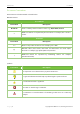


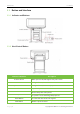
Table Of Contents

ZKAIO4000W User Manual
Page | 9 Copyright©2022 ZKTECO CO., LTD. All rights reserved.
3.2 Button and Interface
3.2.1 Indicator and Buttons
3.2.2 Host Control Button
Indicator and button Description
Power Indicator
When power is ON, blue light shows power status.
Error Indicator
Red light flashes, when errors occurs.
Paper Out Indicator
Red light flashes, when out of paper.
Feed Button
Paper feed operation.
Switch ON-OFF
Control the power of the printer
Cover-open Button
To open the cover and change the paper roll.
Power Button
To control the host of the cash register.
Back Button
Return to previous menu.