
User's Manual
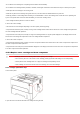


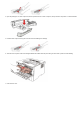



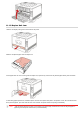

4.Open the front cover.
5. Take the laser toner cartridge out along the track. (For the purpose of preventing printing quality from affecting by the exposure of
photosensitive drum, please put the laser toner cartridge inside the protection bag or warp it with thick paper).
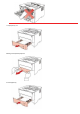
6.Gently pull the jammed paper out.
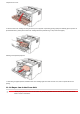
7. After taking out papers jammed, install the laser toner cartridge again and close the front cover, then the printer will recover
printing.
11.1.4.Paper Jam in the Fuser Unit
Note: • When papers jammed in fuser unit are taken out, please pay attention and do not touch the shaded area shown
below in order to avoid burns.