
User's Manual




Open save toner function(applicable to non-Wi-Fi model only).
11 Cancel Execute cancel operation
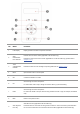
LED control panel
No. Name Functions
1
Drum/paper status
indicator
Indicate the status of paper and drum component (please refer to Chapter 1.5.2.2
)
2
Toner
cartridge/status
indicator
Indicate the status of toner cartridge and others other than paper (please refer to Chapter
1.5.2.2).
3
Cancel/continously
press key
Press this button for more than 2s to cancel current printing operation under normal printing
condition.
Press this button to continue the current printing operation, or press this key for more than 2s
to cancel the current printing operation when paper feed fails or it is lack of paper.
Press this button for more than 2s to print information page at idle state.
1.5.2.Indicator function of control panel
1.5.2.1.Indicator status display of LCD control panel
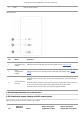
Display meanings of Wi-Fi / save toner indicator are as follows:
No.
Display of
Wi-Fi/save
Status
Status description
(applicable to Wi-Fi
Status description
(applicable to non-Wi-Fi