
Users Manual


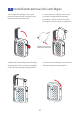
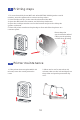


1. If the printer does not print within 10
minutes,cover the nozzle protective
cover.
Printer maintenance
2. When not in use for more than 10
minutes, take out the ink car tridge from
the printer and put the protective clip
on it.
5
Printing steps
1、打 开手机W IF I选择P RTF OX -XX XX X(产 品序列 号) ,输入
密码 连接产 品。
2、扫 描说明 书中 的二 维码(P 1)下 载APP。
3、打 开APP, 输入 内容 ,点击 打印 按键。
4、打 开底部 喷头 保护 盖,按 一下 侧面打 印( 开机 )按钮 。
5、将 打印机 喷头 放在 打印表 面匀 速滑动 打印 机。
4
1. Turn on the mobile phone WIFI and select PRTFOX-XXXXX (product serial
number), enter the password to connect to the product.
2. Scan the QR code (P1) in the manual to download the APP.
3. Open the APP, enter the content, and click the print button.
4. Open the nozzle protective cover at the bottom and press the side print
(power on) button.
5. Place the printer nozzle on the printing surface and slide the printer at a
constant speed.
Please keep the
synchronization wheel
rolling on the printing
surface when printing.
10