
Users Manual


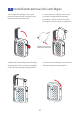


Install and remove ink cartridges
1.Press the ink cartridge cover open
button to open the ink cartridge cover
(the indicator light turns red).
2. Insert the ink cartridge into the ink
cartridge compartment diagonally
from above. (The direction of the ink
cartridge nozzle is shown in the figure)
3
4. Close the ink cartridge cover, and the
indicator light turns green again.
3. Align the ink cartridge with the inkjet
opening and insert it until it completely
enters the ink cartridge compartment.
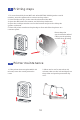
9
*Please remove the
cartridge holder first