
Users Manual


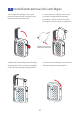


On/off function
Charging function
This product uses the type-c interface
to charge, and the input voltage is 5V-
1A. The indicator light is red when it
isturned off and charged, and it goes
out when it is full.
1
2
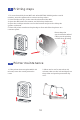
① Power/Print button ② Status Indicator ③
4
IFI indicator
4
①
②
③
5
I n k c a r t ri dg e c o v e r
open button
5
6
Charging port
6
Auxiliar y roller
Synchronous wheel
Cartridge nozzle
opening
Nozzle protection cover
Ink tank cover
Press and hold the power/print button on the side of the
product for 3 seconds, the indicator light turns on and
enters the star tup state (the indicator light changes from
white to green, and the printer is ready).
8
Reset hole(Forced shutdown
by fine needle insertion)