
Operating instructions






1 I
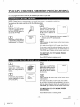
You can deletc or add the desired channels.
-MENU-
Press MENU button. I ' _'_"_
2 PtCTURE CONTROL
3 8ET'TING_LOCK
Select item 4 (CHANNEL ,_. ........5 LANGUAGE SELECT
S SEARCH SELEC_
SET UP) using number 4 B7 USER'SSE'TUPccDS_..EC'T
button.
Select ntem 3 (ADD/DE-
LETE CH) using number 3
button.
- CHANNEL SET UP -
I TVr.._'rv I TV l
2 AUTO PRESET
3 ADD/DELETE CH
I ADI3_34E L_T1E _.4
Enter the desired channel " "_,
number using the number
button or the CHANNEL •
or • button.
4kaz
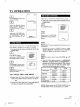
DELETING PRESET CHANNEL
Press ADD/DELETE but- '_'*'_-_"
ton. The channel number ,, _,,
changes to light red. The
channel is deleted from
memory.
• To delete another channel, repeat steps [3] and [4].
• If you press the ADD/DELETE button again, the
channel is memorized again.
ADDING PRESET CHANNEL
Press ADD/DELETE but-
ton. The channel number
changes to light blue. The
channel is added to memory.
• To add another channel, repeat steps [3] and [4].
• If you press the ADD/DELETE button again, the
channel is deleted again.
t Added channel is in light blue.
Deleted channel is in light red.
Press MENU button. The
TV/VCR screen returns to
TV mode.
NOTE: To confirm that channel(s) has been deleted or
added, press CHANNEL • or • button.
-15-
EN
***** 5D19
B5607-02 i