
Operating instructions






I
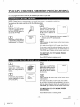
TV/CATV CHANNEL MEMORY PROGRAMMING
You can program the tuner to scan only the channels you receive in your area.
NOTE: Channel memou, programming is not needed when usin_ a converter/dcsclambler box.
You must use the remote control unit for the following steps:
7r7
Plug the TV/VCR power
cord into a standard AC out-
let. Press POWER button to
turn on the TV/VCR.
7Y7
Press SELECT button on the
remote control unit. The
tuner scans and memorizes
all the active channels in
your area.
CH 01
Select item 1 (ENGLISH) or
2 (ESPAI_IOL-SPANISH)
using number 1 or 2 button.
- LANGUAGE SELEC1 -
I ENGL_ ON
2 ESla'AIk'O L
• The TV/VCR distinguishes between standard TV
channels and CATV automatically.
r-r?
After scanning, the tuner stops on the lowest memo-
rized channel.
(TV mode: from CH 02/CATV mode: from CH 01)
If you want to recall the selected channels, you can se-
lect thc desired channel directly by number button or
CHANNEL • or • button on the remote control unit.
TO RETURN TO TV MODE WHEN
SCANNING
Press MENU button in scanning mode.
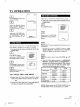
Press MENU button.
Select item 4 (CHANNEL
SET UP) using number 4
button.
If you need, press number 1
button repeatedly to select
[TV] or [CATV].
-MENU-
1 TIMER
2 PICTURE ODNI"ROL
8ET_NG GLOCK
d P._/UCt_ELSET UP
b LAf_GU&GEt.ELEC'I"
• BEAR_ 8ELECT
7 USER'S SETuP
8 CCO SELECT
- CHANNEL SET UP -
t TViCATV ( TV ]
2 AUTO PRESE'r
3 A_ELETE CH
]
Select item 2 (AUTO PRE-
SET) using number 2 button.
The tuner scans and memo-
rizes all the active channels
in your area.
CH 02
After scanning, the tuner stops on the lowest memo-
rized channel.
(TV mode: from CH02 / CATV mode: from CH01 )
If you want to recall the selected channels, you can se-
lect the desired channel directly by number button or
CHANNEL • or • button on the remote control unit.
TO RETURN TO TV MODE WHEN
SCANNING
Press MENU button in scanning mode.
-14-
EN
,k * -_,,_ .ik 5DI9
B5607-02 I