
User`s manual




Zaxcom Deva User’s Manual_______________________________________________________ Chapter 3
53
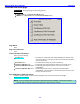
Output Routing Presets page
Page purpose: This page sets-up the Play column of the Output Routing section for the Output Mix.
How to get here:
(MENU key Output Mix button Routing Presets button)
Deva-16 view Deva-5.8 view
Figure 3-11 Output Routing Presets page
Page Notes
Once you have made your selection on this page, go to the previous page to see what effect your choice had.
Page Level Shortcuts
None
Normal button
Outputs come from the Output Mix bus.
Play Switches button
Outputs come from the disk on playback.
Play Tracks 1-6, 15-16 button (Deva-16 only)
Play Tracks 1-6, 9-10 button (Deva-5.8 only)
This button varies based on the hardware:
Deva-16: Play Tracks 1-6, 15-16 button. As the label indicates, it sets the playback tracks to 1-6, 15 & 16.
Deva-5.8: Play Tracks 1-6, 9-10 button. As the label indicates, it sets the playback tracks to 1-6, 9 & 10.
Play Tracks 9-16 button (Deva-16 only)
Play Tracks 3-10 button (Deva-5.8 only)
This button varies based on the hardware:
Deva-16: Play Tracks 9-16 button. As the label indicates, it sets the playback tracks to 9-16.
Deva-5.8: Play Tracks 3-10 button. As the label indicates, it sets the playback tracks to 3-10.
Mute Play button
Outputs are muted during playback.