
User`s manual







Zaxcom Deva User’s Manual_______________________________________________________ Chapter 1
19
Chapter 1 – Introduction
Overview
The Zaxcom Deva is a high-resolution audio mixer and recorder for reality television surround recording and
ENG. Lightweight and power efficient, it replaces multiple mixers and portable recorders that are currently used
to mix audio for recording to camera via RF link or hardwired cable.
The Deva has an extensive software and hardware history based on the continuous refinement of our location
recording technology.
The functions of mixing, recording and audio effects are seamlessly integrated providing features, functionality and
audio quality unobtainable with separate solutions. Deva's eight mix busses are a perfect match for the new
generation of ENG cameras that record four to eight tracks of audio.
The Deva is ideal for use with Holophone™ and SoundField™ microphones.
This section describes the Deva’s physical features and their location.
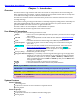
User Manual Conventions
Throughout this manual, the following conventions are used:
button – refers to an on-screen (VIRTUAL) object that represents a parameter that can be changed
and/or viewed.
CF card – refers to any CompactFlash card that meets the tests outlined in CompactFlash Cards
{p.21}.
cycle – is used when the selection rotates through several different possible selections.
cycle the power – refers to turning power to the unit ‘OFF’, waiting a few seconds and then turning the
power ‘ON’.
default setting – refers to the value that is loaded into the associated parameter, in the event that the
Restore Factory Defaults button {p.82} is pressed. The value is highlighted.
key – refers to a PHYSICAL object on the unit for the Operator to change and/or view a
parameter or to navigate through the menu pages.
(A key) + (B key) – Simultaneously press the two keys.
(key press shortcut sequence) – It is necessary to move through the menu pages to get to the page where
changes are to be made. The most efficient way to indicate this is through the sequence
of keys/buttons to be pressed. For example: (SHIFT + SETUP keys Meters button)
means to simultaneously press the SHIFT and SETUP keys then press the Meters button
in the page that is displayed.
{p.##} – refers to the page number on which the item is described.
toggle – is used when the selection switches between two possible selections.
NOTE: A green NOTE is a helpful hint or bit of information.
IMPORTANT: A blue IMPORTANT note indicates something more important than a green NOTE.
CAUTION: A yellow CAUTION note indicates a situation that, if ignored, could cause a significant problem.
WARNING: A red WARNING note indicates a situation that, if ignored, could cause damage to you, your
equipment and/or your reputation.
System Features
Deva-5.8 Specific
10 recording tracks
10-pin Hirose connector for direct connection to supported cameras
6 analog outputs
Deva-16 Specific
16 recording tracks
10-pin Hirose connector for an additional 4 line-level analog inputs
8 analog outputs